NIS-2 and DORA: What They Mean for Enterprise Networks
NIS-2 and DORA are changing cybersecurity requirements across Europe. Learn what they mean for enterprise networks, risk management, incident response, and secure remote access.



![[Translate to Englisch:]](/fileadmin/user_upload/NCP_Blog/2026/Remote_Access.jpg "[Translate to Englisch:]")
Remote access is essential to modern work, but it also expands a company’s attack surface. A VPN alone is not enough. Strong authentication, endpoint security checks, network segmentation, and temporary access for service providers are all needed to protect corporate networks and critical resources.
Working from home, mobile work, and remote maintenance are now part of everyday operations for many companies. However, one compromised access point can give attackers a path to critical internal systems – and the opportunity to cause significant damage.
In 2025, the Federal Statistical Office reported that 24.6% of employees worked from home at least occasionally. Before the pandemic, the figure was just 12.9% in 2019. The rate has nearly doubled.
However, remote work varies widely by occupation. More than 43% of executives and almost 50% of professionals work from home at least some of the time, compared with 27% of technicians. Skilled tradespeople, at 5.5%, and machine operators, at 1.6%, remain largely tied to physical workplaces.
At the same time, the German Federal Office for Information Security (BSI) lists vulnerabilities in VPN gateways and other internet-facing systems among the entry points frequently exploited by attackers. Every additional access option expands the attack surface. Personal devices used for work – often referred to as bring your own device (BYOD) – and partially managed devices add further risk.
Weak passwords are among the most common remote access risks. Because users do not want to remember many complex passwords, they often reuse the same password or make only minor changes. A breach involving one service may then expose several accounts.
Strong password policies and multifactor authentication (MFA) can reduce this risk. Authenticator apps and passwordless methods such as passkeys provide additional protection. MFA should be required for all external access, not only for administrator accounts.
Poorly secured endpoints are another major concern. Endpoint security checks should verify the operating system and version, antivirus protection, certificate status, and VPN client version whenever a device connects. If the device does not meet company requirements, access should be blocked.
If an attacker still gains access, network segmentation limits how far they can move. Production networks, development environments, office systems, and sensitive databases should be placed in separate zones. Remote users should have access only to the systems required for their work.
Virtual private networks remain a core part of remote access security. They encrypt traffic between remote employees, company locations, and cloud applications, protecting data from interception and tampering.
A VPN alone, however, is not enough. It provides meaningful protection only when combined with strong authentication, network segmentation, least-privilege access, and continuous monitoring. These measures apply to both employees and external parties, including maintenance teams, IT service providers, and software vendors.
Third-party access should be temporary, limited to a specific purpose, and restricted to the systems required for the assignment. Once the work is complete, the account should be automatically disabled or deleted. Companies often have limited control over third-party devices. Endpoint posture checks and complete session logs help reduce this risk.
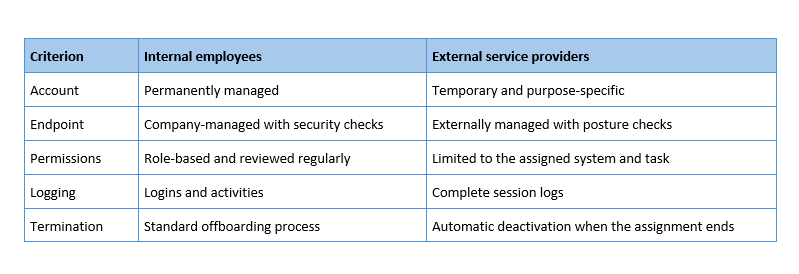
Modern remote access solutions can continuously monitor active sessions. They can detect unusual login times, unexpected locations, or access from unknown devices and require users to verify their identity again when suspicious activity occurs. Session logs then support audits, investigations, and forensic analysis.
Review each item and identify what is fully implemented, partially implemented, or still missing:
The first step requires only time: document who can access each system, which devices they use, and what permissions they have. This process often reveals forgotten test accounts or accounts belonging to former service providers. Disabling them immediately reduces risk. The next step is to combine the safeguards effectively. Encryption, endpoint checks, access controls, and network segmentation provide the strongest protection when they work together.
Daily operations ultimately determine whether these measures remain effective. Companies must update clients, adjust policies, review permissions, and monitor logs. Managing separate installations can consume significant staff resources. NCP brings these tasks together in a central management console.
Centrally Managed VPN Solutions at a Glance
What protection does a VPN not provide?
A VPN alone cannot protect against compromised credentials or insecure endpoints Encryption does not prevent attackers from using stolen credentials to gain unauthorized access. The VPN gateway is also exposed to the internet, making it an attractive target. Without timely security updates, the gateway itself can become the vulnerability it is intended to prevent.
How long may IT retain remote access logs?
Data protection law generally does not define a single retention period. Instead, companies must limit data collection and storage to a clear purpose. Many organizations retain access logs for 30 to 90 days and extend the period only when investigating a specific incident. Companies should document the retention period, who may access the logs, and the reasons the data may be reviewed.
What should companies do if IT does not manage the device?
Avoid storing sensitive data on the device. Virtual desktop or terminal access keeps files in the data center while the personal device displays only the remote session. This approach should be combined with limited permissions and a user agreement covering liability, support, and account blocking if the device is lost.
What should companies expect during an MFA rollout?
The technology can often be deployed quickly, but the organizational process requires careful planning. Companies should answer several questions in advance: Who receives a backup method if a smartphone is lost? How will users complete the initial registration securely? Who is authorized to reset authentication factors? Start with administrator accounts and external service providers, then expand MFA to the rest of the workforce.
You might also be interested in:
NIS-2 and DORA: What They Mean for Enterprise Networks
NIS-2 and DORA are changing cybersecurity requirements across Europe. Learn what they mean for enterprise networks, risk management, incident response, and secure remote access.
Zero Trust Implementation: Best Practices and Lessons Learned
Zero Trust in Practice: US audits offer organizations clear lessons on network segmentation, data protection, legacy systems, and identity management.
Digital Sovereignty: Regaining Control Over Data, Access and Digital Infrastructure
Digital sovereignty starts with control over your data. Learn how GDPR, the US Cloud Act, data localisation, encryption and secure remote access help organisations strengthen compliance and reduce digital dependencies.